Biomes and vegetation
A biome determines what covers a patch of terrain: the trees, the grass, the ground itself.
Where biomes come from
Biomes are produced along with the relief, when you run Generate Biome in the Sandbox. This is the step that gives your world its natural look: forests on the slopes, beaches by the water, meadows in the hollows.
Since version 0.8 these computations have been reworked: the result looks noticeably better and puts less load on your machine.
Repainting by hand
The generated result is not set in stone. The Biome section of the Sandbox lets you paint over what the computation produced.
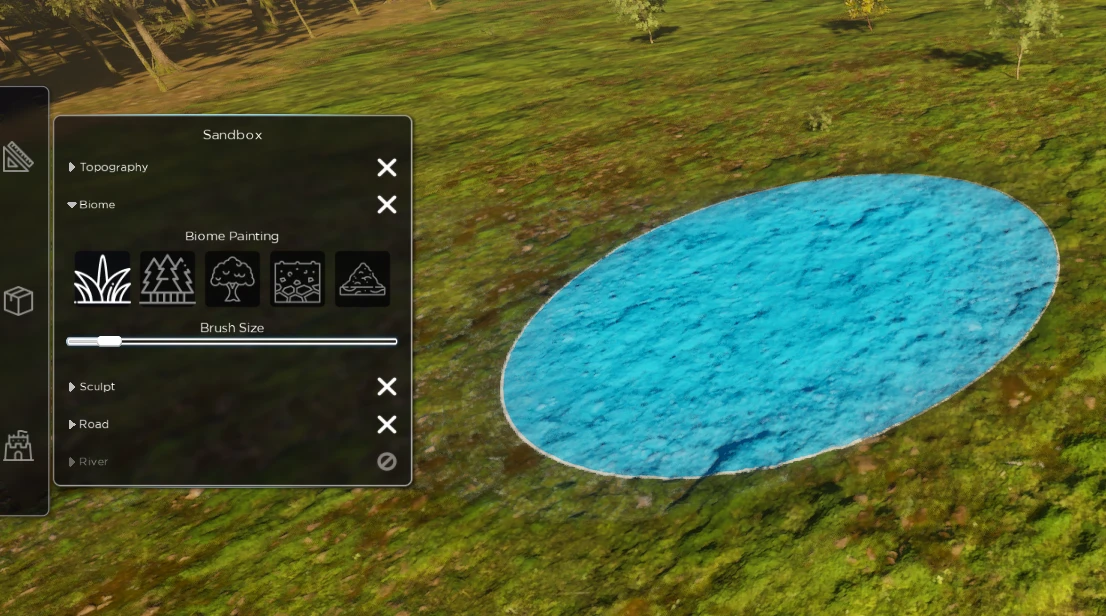
The five brushes
| Brush | What it lays down |
|---|---|
| Grass | Meadow, open ground |
| Conifers | Fir and pine forest |
| Broadleaf | Broadleaf forest |
| Cobblestone | Paved ground, for paths and squares |
| Sand | Beach, dune, sandy ground |
The Brush Size slider sets the brush size.
When to use it
- Clear a spot for a village or a camp
- Lay a cobblestone path between two places
- Turn a patch of forest into a clearing
- Add a beach where the generation put none
- Change the species of a wood, from conifers to broadleaf
Controlling vegetation
Placing an asset no longer clears the vegetation around it automatically. That choice is yours to make: if a tree gets in the way of your build, brush the area with Grass or Cobblestone to clear it.
Vegetation and performance
Vegetation generation is the most expensive operation in Menyr. Two behaviours worth knowing:
- Detail vegetation (grass, pebbles, branches) appears after the trees have generated across the whole map
- It only appears around the player, not across the entire map
On some machines this generation can cause stutters. Caching is planned soon, which will considerably reduce the CPU cost.